


Even with the terminal, tmux, and an AI agent ready to go, one piece is still
missing: the editor itself. AI generates plenty of code, but you still need a
fast, keyboard-driven place to read and navigate it. For me that place is
Neovim.
It's tempting to think that in an era where AI agents write most of the code and developers mostly review pull requests, a powerful editor matters less than it used to. I don't buy it. Being able to jump into a codebase by hand - chase a definition, grep for a pattern, sketch a quick experiment, fix something small without spinning up a whole agent loop - is a skill that won't go away. It matters even more when you're working on a remote machine over SSH, where a GUI IDE is awkward but a terminal editor feels native.
There are other terminal editors out there, but out of all the alternatives
Neovim is the one that feels mature and powerful enough for full-time software
development. It also runs equally well on a beefy workstation and on a phone
over SSH, which matters a lot in the workflow described in earlier articles.
Custom config, not a distribution
There are pre-packed Neovim distributions out there that ship with everything
already wired up - colorscheme, LSP, fuzzy finder, file tree, the works. They
get you to a polished IDE in minutes, and that's a perfectly fine starting
point.
In my case I preferred to configure everything on my own. It takes more time upfront, but in return I get more control and customization, a leaner setup, and noticeably better performance - at the cost of having fewer features than a fully loaded distribution. Whatever is in my config is there because I put it there, which makes it much easier to reason about (and easier for AI to reason about, when I ask it to help).
One thing worth being honest about: I don't really use the things Vim and
Neovim are famous for - macros, advanced motions, the whole modal-editing deep
end. I use Neovim in a way that's pretty close to how I'd use a GUI editor
like Visual Studio Code: open a file, jump around with a fuzzy finder, edit,
save. The terminal-native nature and the plugin ecosystem are what I'm really
after.
If you want to see the full configuration, it lives in my env-setup
repository:
nvim-init.lua.
Below I only highlight the plugins that turn Neovim into something close to a
full IDE.
The plugins that matter
I only list the ones I consider most important here. There are a few smaller
helpers in my config that I won't cover - if you're curious, they're all visible
in the init.lua linked above.
Language intelligence
- coc.nvim - LSP client with a rich extension ecosystem (TypeScript, Deno, Lua, Terraform, Docker, YAML, ESLint, Prettier...). This is what gives me go-to-definition, rename, diagnostics, and code actions.
- nvim-treesitter - proper syntax highlighting and indentation across 40+ languages.
Navigation and search
- telescope.nvim - fuzzy finder for files, live grep, references, jumplist, and more. The single plugin I'd miss the most.
- nvim-tree.lua - the file explorer sidebar.
- bookmarks.nvim - persistent bookmarks across sessions, very handy in larger codebases.
Looks
- tokyonight.nvim - the colorscheme.
- lualine.nvim - the status line.
- barbecue.nvim - breadcrumb bar showing current code context.
- indent-blankline.nvim and nvim-colorizer.lua - small visual touches that help when scanning code.
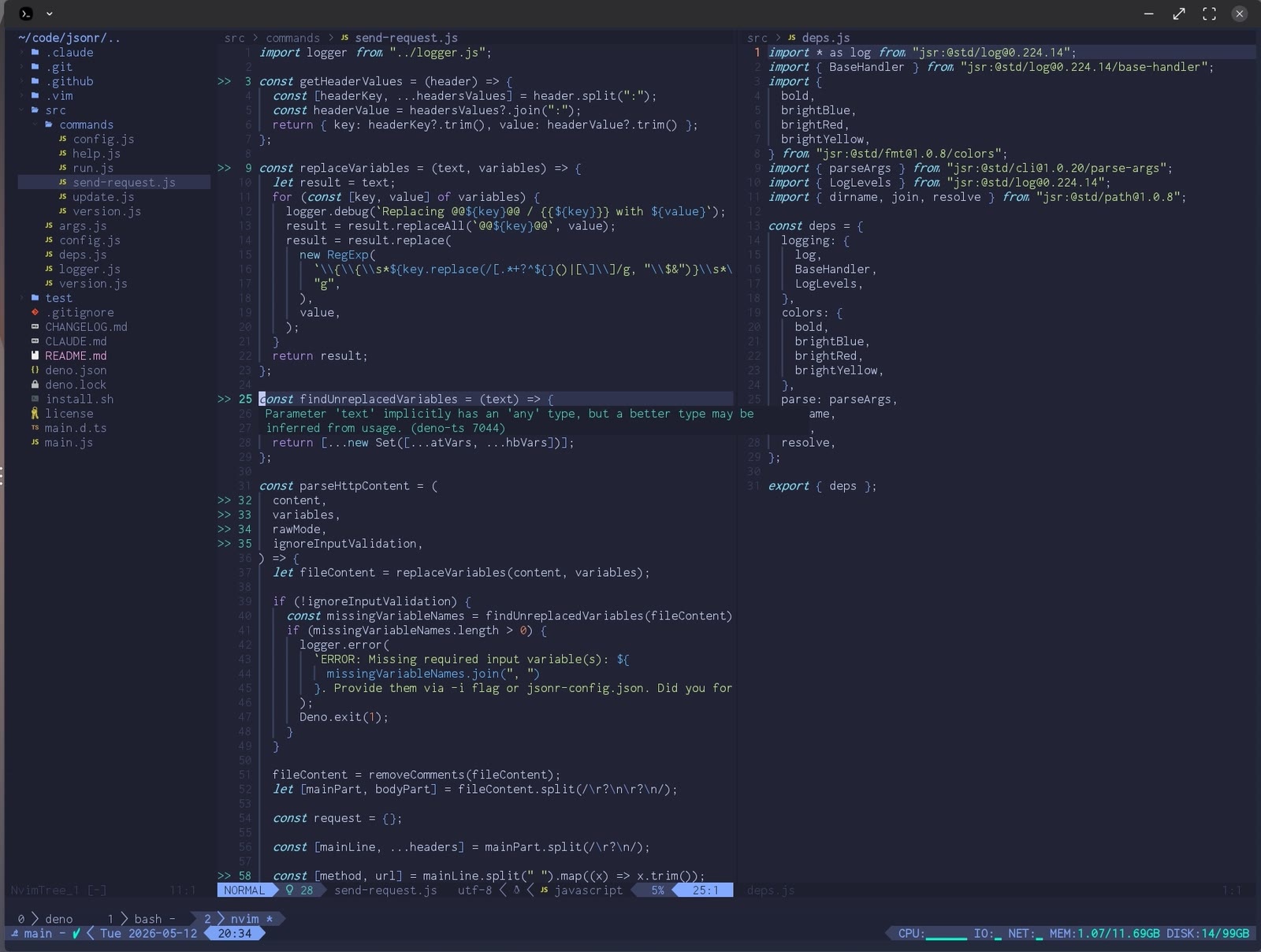
Once everything is configured - Neovim is a great tool for navigating a codebase with focus.
Wrapping up the terminal walkthrough
That closes the loop on the terminal-based setup: emulator and font, tmux for
layout and persistence, AI agents living next to your shell, and Neovim as the
IDE that ties it all together. None of the pieces are exotic on their own - what
makes the workflow powerful is how well they compose. Once your hands stop
leaving the keyboard, going back to a mouse-driven IDE feels like a downgrade.
Comments