


A few years ago, while working on a .NET project, I frequently had to inspect data in a SQL Azure database. Opening SQL Management Studio each time, waiting for it to load, connect, and finally accept a query, got old fast. I started looking for a simple CLI tool I could script against — something with JSON output and a manageable list of connections. I didn't find anything that fit, so I built sqlr.
It lets you define and manage connections from the CLI. Once a connection is set
up, querying the database is as simple as
sqlr query "select * from main.users".
Why sqlr?
- Lightweight & focused: A handful of commands —
add,describe,query. You learn it in minutes. - JSON-first output: Results are JSON by default, so they pipe straight into
jq, scripts, or another tool.--tableand--compactflags are there when you want to read them yourself. - One CLI, multiple databases: PostgreSQL, MySQL, MSSQL, ClickHouse and SQLite — all behind the same commands.
- Connections scoped to the git repository:
sqlrwalks up from the current directory looking for a.gitfolder. Connections defined inside a repo stay with that repo. No accidental cross-project queries. - Encrypted at rest: Connection strings can be encrypted with a password.
SQLR_ENCRYPTION_PASSWORDlets scripts and AI agents decrypt without prompting, while the secret never lives in plaintext on disk. - SQL files with variables: A
.sqlfile with{{placeholders}}is a versionable artifact — commit it next to the code that depends on it, then run it with-i "key: value".
Let's see it on example of SQLite database:
Setting up
I'll use the Northwind sample database
sqlr add -n northwind -t sqlite -s ./northwind.db(You can also run sqlr add with no arguments to walk through an interactive
wizard.)
Pin it as the default for this directory so we can drop -n from every command
that follows:
sqlr set northwindA quick sanity check:
sqlr ls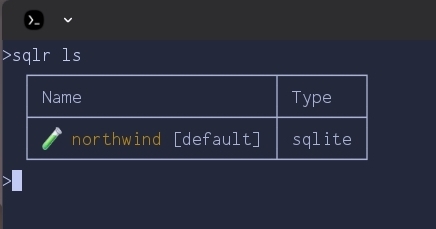
If you run
sqlr addinteractively, you'll also be asked to pick an icon and color so each connection is easier to spot at a glance.
The connection is stored — but only for this directory. Because we're inside a
git repository, sqlr scoped both the connection and the default to the repo.
Move outside and sqlr ls will show a different (likely empty) list. This is
deliberate: each project carries its own database connections, and you won't
accidentally fire a query at production from an unrelated checkout. Teammates
cloning the repo just add their own local connection and run sqlr set once. If
you do want a connection available everywhere, add it with -g.
To clear the default later, run sqlr set with no arguments.
Exploring the schema
Before writing any SQL, let's see what's inside. sqlr describe prints the full
schema; for a quick overview, ask only for table names:
sqlr describe --tables-only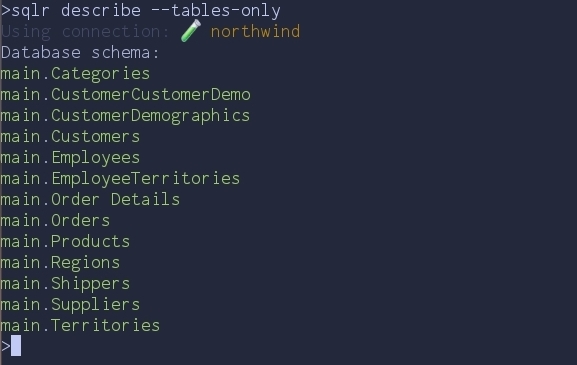
--tables-onlygives a quick overview of every table without the column-level noise.
Thirteen tables — a classic order-management schema. Let's drill into Products
with --compact and a filter:
sqlr describe -f Products --compact
--compactpacks the same information into as little space as possible.
A few things to notice in that one line:
?marks nullable columns.- Foreign keys render as
Column -> "target.table.column", so the join graph is right there in the output. - One row per table means it pipes cleanly into other tools and reads well in an
LLM context. Use
--tablewhen you want a human-friendly grid instead.
That's enough to start writing real queries — we know which tables exist, which columns are nullable, and how they connect.
Running queries
The query keyword is optional — anything sqlr doesn't recognise as a command
is treated as SQL. So this works:
sqlr "SELECT c.CompanyName, c.Country, COUNT(o.OrderID) AS orders
      FROM Customers c
      JOIN Orders o ON c.CustomerID = o.CustomerID
      GROUP BY c.CustomerID
      ORDER BY orders DESC
      LIMIT 5" --table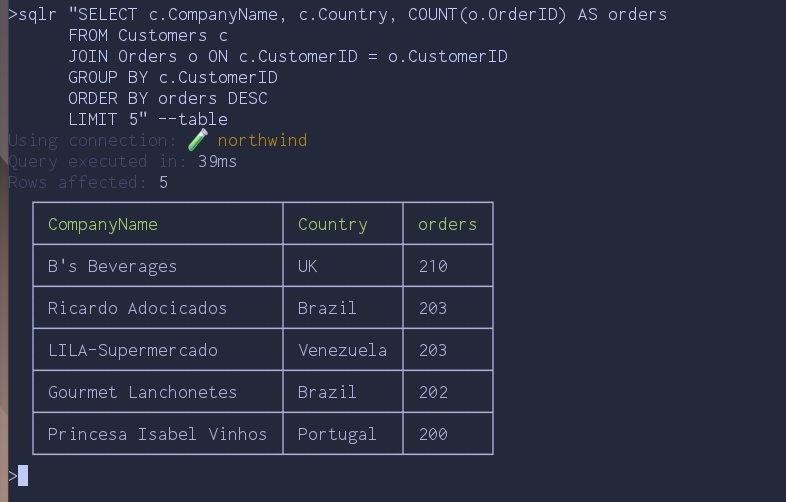
--table is the human-friendly view. Drop it and you get JSON, which is what
you actually want once a query graduates from interactive exploration to
something a script (or AI agent) consumes.
Versioning queries: SQL files with variables
Inline SQL is fine for one-offs, but the moment a query gets useful you want it
in git. sqlr runs .sql files directly and supports {{variable}}
placeholders that get filled from the command line.
Save this as top-products-by-country.sql:
SELECT
  p.ProductName,
  SUM(od.Quantity) AS units_sold,
  ROUND(SUM(od.Quantity * od.UnitPrice), 2) AS revenue
FROM Products p
JOIN "Order Details" od ON p.ProductID = od.ProductID
JOIN Orders o ON od.OrderID = o.OrderID
JOIN Customers c ON o.CustomerID = c.CustomerID
WHERE c.Country = '{{country}}'
GROUP BY p.ProductID
ORDER BY revenue DESC
LIMIT 5;
Then run it:
sqlr top-products-by-country.sql -i "country: Germany" -y --table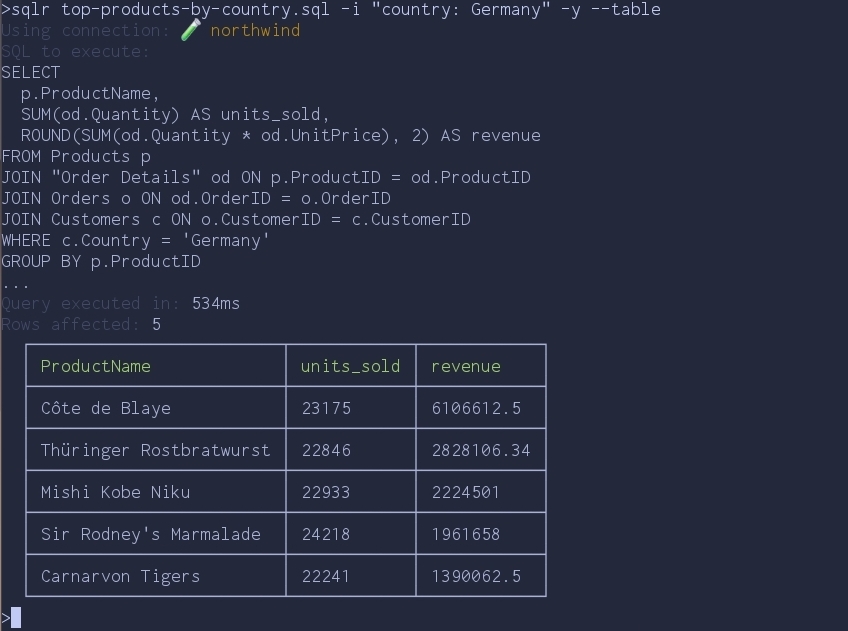
A few things worth calling out:
-i "key: value"fills each{{key}}placeholder. Pass-imultiple times for multiple variables.sqlrpreviews the SQL it's about to execute and asks for confirmation when running a file.-yskips the prompt — useful in scripts, omit it for anything destructive you want to eyeball first.- If the file references
{{key}}but you forget-i,sqlrrefuses to run rather than firing a query with literal{{key}}in it.
The file is now a versioned, parameterised artifact. Commit it next to the code that depends on it, share it with your team, schedule it from cron — same query, different inputs, no copy-paste.
Piping into scripts: JSON output
Once you drop the --table flag, results come out as JSON. Add -o to write
them straight to a file:
sqlr "SELECT c.Country, COUNT(o.OrderID) AS orders
      FROM Customers c
      JOIN Orders o ON c.CustomerID = o.CustomerID
      GROUP BY c.Country
      ORDER BY orders DESC
      LIMIT 3" -o orders-by-country.json
The resulting orders-by-country.json:
[
  { "Country": "USA", "orders": 2280 },
  { "Country": "France", "orders": 1909 },
  { "Country": "Germany", "orders": 1895 }
]
From here it's just JSON — jq it, post it to Slack, drop it in a daily report.
The point is that there's no parsing layer between you and the data; the CLI
hands you a structure, not text you have to scrape.
Using sqlr with AI agents
Structured JSON output is also what makes sqlr work well with AI agents.
There's no MCP server to install, no separate adapter, no schema layer to keep
in sync. Drop the binary in the agent's environment, and a prompt like:
run
sqlr helpand list all tenants signed up in the last 3 days
is enough. The agent reads sqlr help, lists connections with sqlr ls, learns
the schema with sqlr describe --compact, and writes the query. The same three
steps you would run yourself, just typed by something else.
Conclusion
sqlr exists because I wanted a single small CLI for the database tasks that
otherwise pull me into a GUI. Define a connection once, set it as the default,
describe the schema, query it, version the useful queries as .sql files, pipe
results into other tools — that's most of what I do with a database day-to-day,
and now it lives in the terminal next to everything else.
Comments